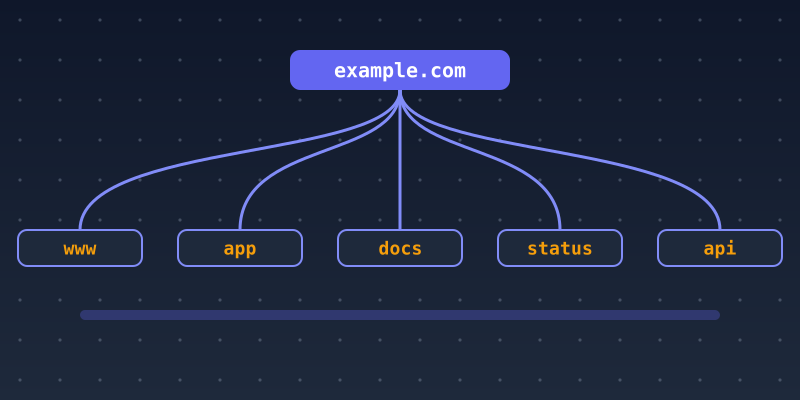
As a business grows, its domain grows with it. A single website becomes a marketing site, a customer app, a help center, a status page, staging environments and email sending services. Subdomains are the usual way to organize all of this, and without a plan they quickly become hard to manage. These ten strategies help you keep your DNS organized, secure and easy to scale.
1. Plan a naming scheme before you need it
Decide on a short, consistent set of names and write them down: for example www for marketing, app for the product, docs or help for support, status for uptime and api for programmatic access. Predictable names are easier for customers to trust and for your team to manage. Avoid names that reveal internal details, such as server models or project code names.
2. Separate the product from the marketing site
Hosting your application on app.example.com and your marketing site on www.example.com lets each run on the platform that suits it. Teams can deploy independently, and an outage or misconfiguration on one does not take down the other.
3. Give staging and development environments their own protected names
Use subdomains such as staging.example.com for pre-production testing, but protect them. Put them behind authentication or an IP allowlist, tell search engines not to index them, and never copy real customer data into them without safeguards. Our post on setting up a staging subdomain covers this in detail.
4. Automate TLS certificates
Every public subdomain needs a valid HTTPS certificate. Use automated issuance and renewal, for example through an ACME client with a certificate authority such as Let's Encrypt, so certificates never expire unnoticed. Wildcard certificates (*.example.com) can simplify setup, but they require DNS-based validation and widen the impact if the private key leaks. See wildcard vs. multi-domain certificates to choose.
5. Keep an inventory and prevent subdomain takeover
A subdomain takeover happens when a DNS record still points at an external service, such as a cloud bucket, hosting platform or SaaS app, that you no longer control. Someone else can then claim that resource and serve content under your name. Prevent it by keeping an up-to-date inventory of every record, removing DNS entries as soon as a service is retired and reviewing records regularly. Our guide to subdomain security threats explains the risk.
6. Scope cookies carefully
A cookie set with Domain=example.com is sent to every subdomain, including ones run by third parties or less trusted apps. Set sensitive cookies, such as session tokens, without a Domain attribute, or with the narrowest host possible, and mark them Secure and HttpOnly. Keep untrusted or user-generated content on a separate registrable domain, not on a subdomain of your main one.
7. Use dedicated subdomains for bulk email
Many organizations send marketing or bulk email from a subdomain, such as news.example.com, and keep the main domain for person-to-person mail. Configure SPF, DKIM and DMARC for each sending domain so messages authenticate and align. Separating the streams makes problems easier to diagnose and helps keep everyday mail deliverable.
8. Make SEO decisions on purpose
Search engines can treat subdomains somewhat separately from the main site, so content you want to rank together, such as a blog or guides, often belongs in a subdirectory like /blog/. Use subdomains when there is a technical or organizational reason. Our article on subdomain vs. subdirectory walks through the trade-offs.
9. Add DNS safeguards
- Publish CAA records to limit which certificate authorities may issue for your domain.
- Use sensible TTLs: shorter before planned migrations, longer for stable records.
- Turn on DNSSEC if your registrar and DNS host support it and your team can manage it.
- Protect your registrar and DNS accounts with strong, unique passwords and multi-factor authentication.
10. Monitor what the world can see
Public certificates are recorded in Certificate Transparency logs, so the hostnames on them can be discovered by anyone. Monitor these logs for certificates you did not request, and check your subdomains regularly for unexpected content, expired certificates and dangling records. Uptime checks on key subdomains such as app and api catch outages early.
Summary
Subdomains scale well when you treat them as part of your infrastructure, not as one-off shortcuts. Plan the names, separate concerns, protect non-production environments, automate certificates, retire records promptly and monitor what is exposed. For the basics, start with What Is a Subdomain? and DNS Records Explained.